
Smart Home Automation

Mastering Polar Fitness Trackers
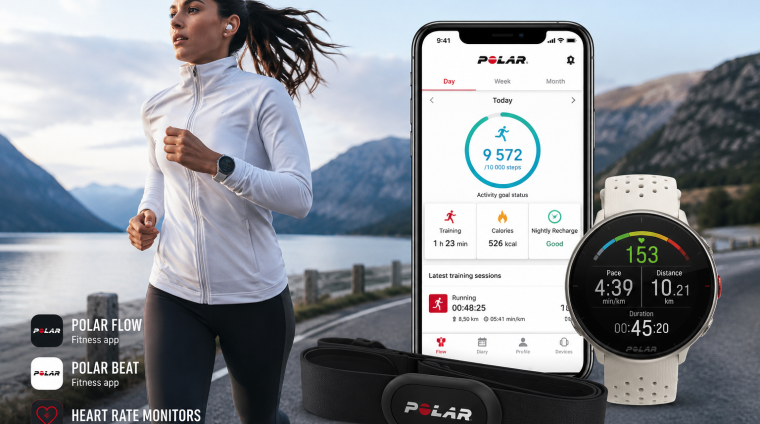
Take control of your training, activity, recovery and health data with a complete, practical guide to the Polar fitness ecosystem. This course teaches you how to choose, configure and confidently use Polar devices and applications—from your initial setup to advanced training analysis.
What This Course Teaches
You will learn how Polar fitness trackers, sports watches, heart-rate sensors and mobile applications work together. The course guides you through device setup, sensor pairing, profile configuration, activity tracking, workout recording, heart-rate monitoring, sleep and recovery insights, training planning, data synchronization and performance analysis.
You will also learn how to interpret Polar’s measurements and turn your data into practical decisions that support your personal health, fitness and performance goals.
Who This Course Serves
This course is designed for:
- Complete fitness-tracker beginners
- Recreational walkers and runners
- Cyclists, hikers and outdoor adventurers
- Gym and strength-training users
- Multisport and endurance athletes
- People monitoring their general health, activity, sleep and recovery
- Existing Polar users who want to understand their devices more fully
- Anyone deciding which featured Polar product best fits their needs
Whether you are starting your first fitness journey or refining an established training program, the course provides a clear learning path from beginner fundamentals to more advanced applications.
Skills You Will Develop
By completing this course, you will be able to:
- Choose the right Polar product for your activities and goals
- Set up and personalize compatible Polar devices
- Wear and use each device correctly for more reliable results
- Pair heart-rate sensors and other compatible equipment
- Configure sport profiles, training views and device settings
- Record workouts, daily activity, sleep and recovery information
- Understand heart-rate zones and training intensity
- Create and follow structured training sessions
- Synchronize information across the Polar ecosystem
- Navigate and use Polar Flow and Polar Beat
- Review training history, trends and performance measurements
- Recognize common data-quality and synchronization problems
- Troubleshoot frequently encountered device and application issues
- Apply Polar data to make better-informed training and recovery decisions
Products and Applications Covered
The course provides detailed coverage of:
- Polar H10 heart-rate sensor
- Polar Grit X outdoor multisport watch
- Polar Grit X2 outdoor sports watch
- Polar Loop activity tracker
- Polar Flow mobile application
- Polar Flow web service
- Polar Beat training application
- Compatible Polar sensors, accessories and supporting services where relevant
Product comparisons throughout the course will help you understand what each device does, how the products differ and which option is most appropriate for particular users and activities.
Prerequisites
No previous experience with Polar products, fitness trackers or sports watches is required. The course begins with the fundamentals and gradually progresses to more advanced training, analysis and troubleshooting topics.
For the practical activities, students should ideally have access to at least one featured Polar device and a compatible smartphone or computer. Access to every product covered in the course is not required.
Students should also be willing to create or use a Polar account, install the appropriate Polar applications and complete guided setup and training exercises.
Course Structure
The course follows a progressive, step-by-step structure. You will begin by exploring the Polar ecosystem and comparing the featured products. You will then move through account preparation, device setup, correct wearing and placement, application navigation, activity tracking, workout recording, heart-rate training, sleep and recovery, training analysis and advanced personalization.
Lessons include clear explanations, guided exercises, independent practice, practical examples, downloadable resources, troubleshooting guidance and section quizzes. Each section builds on the knowledge developed previously while remaining useful as a future reference.
Expected Outcome
By the end of the course, you will be able to use your Polar device and its supporting applications with confidence. You will understand what your fitness and training data means, know how to improve the reliability of your results and be able to apply those insights to your activities, workouts, recovery and long-term goals.
Instead of simply collecting numbers, you will have the knowledge and practical skills needed to turn the Polar ecosystem into a useful personal training, fitness and wellness tool.
- 38 Sections
- 8 Lessons
- Lifetime
- Section 1 - Welcome, Course Navigation and Your Polar PathBegin with a clear overview of the course, the featured Polar products and the learning resources available to you. You will identify your personal goals and choose a recommended pathway through the course based on your device, activities and experience level.9
- 1.11. Welcome: what you will confidently do by the end
- 1.22. Meet the four featured products
- 1.33. Choose your pathway: buyer, H10, Grit X, Grit X2, Loop or multi-device
- 1.44. How beginner and advanced layers work
- 1.55. How to use videos, transcripts, downloads and version labels
- 1.66. Educational, safety and privacy boundaries
- 1.77. Build your personal course setup record
- 1.88. Your Polar Path Is Ready
- 1.9Chapter 1 Quiz0 Questions
- Section 2 - Choose the Right Featured Polar ProductCompare the Polar H10, original Grit X, Grit X2 and current Polar Loop according to their intended uses, capabilities and ideal users. By the end of this section, you will be better equipped to choose the product—or combination of products—that supports your fitness goals.0
- Section 3 - Understand the Polar Ecosystem and Feature OwnershipDiscover how Polar devices, mobile applications and web services work together. This section clarifies where information is recorded, synchronized, displayed and managed so you can build a reliable Polar workflow without confusing the responsibilities of each product or application.0
- Section 4 - Secure Account, Privacy and Permission SetupCreate and protect your Polar account while configuring the permissions required for dependable operation. You will examine privacy choices, location services, Bluetooth access, health-data permissions and practical account-security habits before beginning regular training.0
- Section 5 - Polar Flow Mobile: Complete Beginner OrientationTake a guided tour of the Polar Flow mobile app on iPhone, with relevant Android differences identified along the way. Learn how to navigate your diary, activity, training, sleep, recovery, device settings, notifications and synchronization tools with confidence.0
- Section 6 - Polar Flow Web: Planning, Reports and Long-Term AnalysisMove beyond the mobile experience and explore the planning and analytical capabilities of the Polar Flow web service. You will learn how to review longer-term trends, organize training information, create targets and use reports to develop a broader understanding of your progress.0
- Section 7 - Polar H10: Unbox, Fit, Pair and VerifyPrepare the Polar H10 for accurate and comfortable use from the very first session. This section covers its components, electrode preparation, strap adjustment, correct placement, initial pairing and the essential checks that confirm your heart-rate signal is working properly.0
- Section 8 - Polar H10: Connectivity, Recording and Advanced UseExplore the H10’s recording and connectivity options in greater depth. Learn how Bluetooth, ANT+, compatible Polar devices, fitness equipment and sensor memory affect your workflow, and how to choose the correct recording method for different training situations.0
- Section 9 - Polar H10: Battery, Care, Reset and TroubleshootingProtect the reliability and lifespan of your H10 through proper cleaning, drying, storage and battery replacement. You will also learn a systematic process for resolving pairing failures, missing heart-rate readings, unstable signals and other common operational problems.0
- Section 10 - Original Grit X: Hardware, Setup and First UseBecome familiar with the original Polar Grit X, including its buttons, display, charging system and watch interface. You will complete the initial setup, connect the watch to Polar Flow, adjust essential settings and prepare it for everyday wear and training.0
- Section 11 - Original Grit X: Everyday Activity, Sleep and WellnessLearn how the original Grit X supports daily activity awareness outside structured workouts. Explore activity goals, continuous heart-rate tracking, sleep information, nightly recovery insights and the everyday measurements that help place your training within a wider wellness context.0
- Section 12 - Original Grit X: Training from First Session to MultisportProgress from starting a basic training session to configuring more advanced workout experiences. This section covers sport profiles, training views, heart-rate zones, targets, laps, timers, manual multisport operation and the decisions required before, during and after a session.0
- Section 13 - Original Grit X: GPS, Hiking, Routes and Outdoor ToolsPrepare the original Grit X for outdoor activities such as walking, running and hiking. Learn how GPS acquisition, route guidance, elevation information, navigation tools, weather-related preparation and outdoor battery choices contribute to a safer and more dependable experience.0
- Section 14 - Original Grit X: Smart Coaching and Advanced InterpretationExplore the coaching and performance information available through the original Grit X and Polar Flow. You will learn what the principal measurements mean, how they relate to one another and how to interpret trends without treating a single result as a complete assessment.0
- Section 15 - Original Grit X: Battery, Care and TroubleshootingMaintain your original Grit X and respond confidently when something does not work as expected. This section addresses charging, battery-saving choices, cleaning, wristband care, synchronization issues, GPS problems, heart-rate difficulties, restarts, resets and support escalation.0
- Section 16 - Polar Grit X2: Hardware, Setup and AMOLED InterfaceGet acquainted with the Polar Grit X2 and its AMOLED-based interface. You will examine the controls, charging process, touchscreen navigation, initial configuration, watch faces, widgets and essential settings needed to create a practical and personalized starting experience.0
- Section 17 - Polar Grit X2: Everyday Activity, Sleep and RecoveryUse the Grit X2 to develop a more complete picture of daily movement, sleep and recovery. Learn how to review wellness-related information, recognize useful patterns and distinguish between general guidance from the device and decisions that require personal or professional judgement.0
- Section 18 - Polar Grit X2: Training and Advanced BiosensingDiscover how to configure and record training with the Grit X2 while exploring its expanded sensing capabilities. This section connects workout operation with heart-rate monitoring, wrist-based measurements, performance tests and the interpretation of advanced physiological information.0
- Section 19 - Polar Grit X2: Maps, Routes, GPS and Outdoor MasteryBuild a dependable outdoor workflow using the Grit X2’s navigation and location-based tools. You will learn how to prepare routes, work with maps, obtain a strong GPS fix, follow guidance and manage settings for walking, running, hiking and other outdoor adventures.0
- Section 20 - Polar Grit X2: Battery, Care, Tests and TroubleshootingKeep the Grit X2 operating reliably through proper care, charging and battery management. You will also practise preparing for supported tests and diagnosing problems involving synchronization, navigation, sensors, notifications, touchscreen behaviour and unexpected device operation.0
- Section 21 - Current Polar Loop: Setup, Fit, LEDs and Screen-Free UseLearn how to begin using the current screen-free Polar Loop, from charging and fitting the device to understanding its LED-based feedback. This section explains how a minimalist wearable can collect useful information while helping you remain less focused on a conventional watch display.0
- Section 22 - Current Polar Loop: Activity, Sleep, Recovery and Automatic TrackingExplore how the current Polar Loop supports passive daily monitoring. You will learn how activity, sleep, recovery-related information and automatically detected training move into Polar Flow, as well as how to review results and recognize situations that may require correction.0
- Section 23 - Current Polar Loop: Manual Training, Fitness Test and CareMove beyond automatic monitoring by learning the Loop’s manual training workflow and supported fitness-assessment process. This section also covers charging, cleaning, storage, synchronization and troubleshooting practices designed to keep the device comfortable and dependable over time.0
- Section 24 - Polar Beat: Complete Operation with Polar H10Use Polar Beat with the H10 to record heart-rate-based workouts directly on your smartphone. Follow the complete process from permissions and sensor pairing to selecting a sport, starting a session, reviewing results, synchronizing information and solving common connection problems.0
- Section 25 - Real Workout Lab: Walking and RunningApply your knowledge during practical walking and running sessions. You will prepare the device, choose a recording source, obtain the necessary signals, monitor useful information during the activity and complete a structured post-workout review in Polar Flow.0
- Section 26 - Real Workout Lab: Hiking and NavigationPlan, record and evaluate a hiking session using an appropriate Polar watch and supporting services. This hands-on section emphasizes route preparation, navigation readiness, GPS behaviour, battery planning, environmental awareness and the review of distance, elevation and effort after the hike.0
- Section 27 - Real Workout Lab: Strength and Indoor CardioDevelop effective workflows for strength training and indoor cardio, where GPS and pace may not be the primary measurements. Learn how to select suitable sport profiles, use heart-rate data appropriately, handle pauses and intervals, and interpret the resulting session in context.0
- Section 28 - Cycling and Multisport WorkflowsConfigure Polar tools for cycling and activities that involve more than one sport. This section explains recording-source decisions, compatible sensor considerations, sport transitions, multisport structures and practical ways to organize varied training without creating fragmented or duplicated records.0
- Section 29 - Heart Rate, Zones and Signal QualityBuild a strong foundation in heart-rate training, beginning with plain-language explanations and advancing to more detailed interpretation. You will explore zones, intensity, maximum heart rate, sensor placement, signal quality and the limitations that should shape responsible use of heart-rate data.0
- Section 30 - Activity, Calories, Sleep and RecoveryLearn how Polar estimates and organizes information about movement, energy expenditure, sleep and recovery. This section helps you interpret daily results as evolving patterns rather than isolated scores, while recognizing the assumptions and limitations behind wearable-generated measurements.0
- Section 31 - Training Load, Tests and Performance TrendsExamine how individual sessions contribute to longer-term training patterns. You will learn to review training load, supported fitness and performance tests, progress indicators and trend information while avoiding common mistakes such as overreacting to one unusual result.0
- Section 32 - Sport Profiles, Targets, Favourites and PlanningPersonalize Polar Flow to match the activities you actually perform. Create and manage sport profiles, training targets, favourites, views, zones and planning tools, then synchronize your choices so they are available where and when you need them.0
- Section 33 - Strava, Komoot and Apple HealthConnect the Polar ecosystem with selected third-party services while maintaining control over your information. This section covers integration purposes, authorization, synchronization expectations, route workflows, duplicate-data risks and a practical troubleshooting sequence for missing or delayed transfers.0
- Section 34 - Data Review, Export, Backup, Deletion and PrivacyTake greater ownership of your Polar information by learning how to review, export, preserve and delete data appropriately. You will also revisit account privacy, connected services and responsible data-handling practices for both everyday use and long-term record keeping.0
- Section 35 - Cross-Device Workflows and Recording-Source DecisionsDecide which device or app should record each workout when you own more than one Polar product. This section compares common combinations and teaches you how to prevent duplicate sessions, avoid competing sensor connections and create a consistent cross-device routine.0
- Section 36 - Master Troubleshooting LaboratoryDevelop a repeatable troubleshooting method that works across Polar devices, Polar Flow and Polar Beat. Through realistic scenarios, you will isolate problems involving power, fit, permissions, pairing, synchronization, firmware, GPS, heart rate, third-party services and account configuration.0
- Section 37 - Long-Term Care and Course Update AwarenessCreate a sustainable maintenance routine for your Polar equipment and course knowledge. You will learn how to monitor device condition, charging habits, straps, batteries, firmware, app changes, support notices and evolving features without allowing routine maintenance to become overwhelming.0
- Section 38 - Capstone, Final Examination and Next StepsBring the entire course together by completing a practical capstone workflow and final assessment. You will demonstrate that you can select, configure, use, review and troubleshoot an appropriate Polar solution, then create a realistic plan for applying your skills after the course.0
